

What is monday.com?
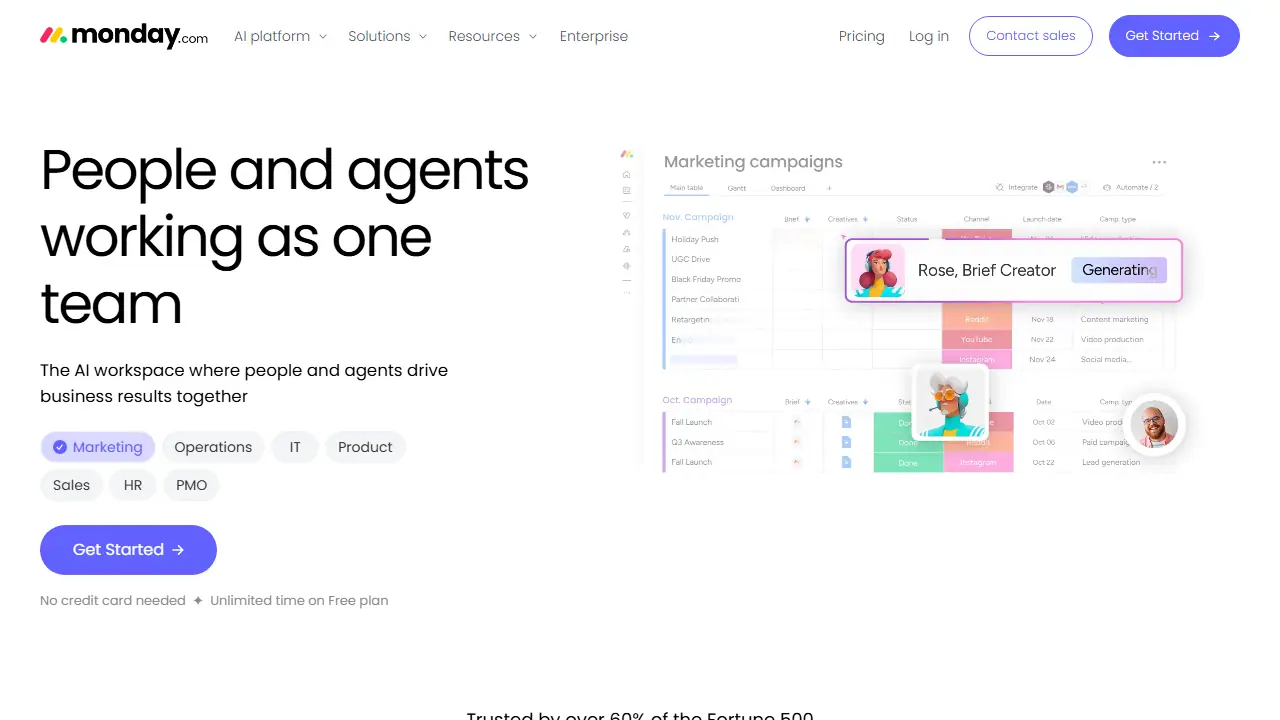
monday.com is a work management platform built around boards, where teams organize projects, clients, processes and data. Its AI layer adds agents that take on specialized tasks such as researching vendors, triaging tickets, scoring deals, screening candidates or tracking project risks, alongside a Sidekick AI assistant that works across your account.
You can use the included agent templates for marketing, IT, product, sales, HR and PMO, or build a custom agent by defining its goal and rules. Other AI features include a meeting Notetaker that turns calls into action items, AI columns that run repetitive work inside boards, and a vibe app builder that turns a business need into a custom app. Agent usage is metered through AI credits that vary by plan.
Key features
- Boards for projects, clients and processes with 8 column types
- AI agent builder with prebuilt agents for marketing, IT, sales, HR and PMO
- Sidekick AI assistant that connects and runs work across the account
- Notetaker for meeting summaries and action items
- Automations and integrations with other tools
- Timeline, Gantt and calendar views
Who is it for
- Project managers and PMO teams
- Marketing and sales teams
- IT and support teams
- Enterprise and SMB operations teams
How to get started with monday.com
- Create a free account on monday.com and choose the Free plan.
- Create your first board by selecting one of 200+ ready templates.
- Add tasks or clients and set status and due date columns.
- Turn on the Timeline or Gantt view to see the project schedule.
- A project team or PMO needs a shared space for tasks and schedules.
- A sales or customer service team wants to track clients and automate repeatable steps.
- You want AI agents to carry out specific tasks under team supervision.
- You need the free plan for more than 2 people or more than 3 boards.
- You rely on large amounts of AI credits without extra fees and have a limited budget.
Pros and cons
- Agents for several business functions in one workspace
- Free plan available with no credit card needed
- AI agent usage is limited by monthly AI credits per plan
- Full features such as API calls and extra automations require paid plans
monday.com pricing
| Plan | Price | Includes |
|---|---|---|
| Free | 0 EUR | Up to 2 seats, 3 boards, 3 Docs |
| Basic | 9 EUR / month | Per seat, billed annually; 1,000 AI credits/month, 3 AI tools, shown for 10 seats |
| Standard | 12 EUR / month | Per seat, billed annually; 2,000 AI credits/month, 5 AI tools, automations and integrations at 250 actions/month, 1,000 API calls/day, shown for 10 seats |
| Pro | 19 EUR / month | Per seat, billed annually; 3,000 AI credits/month, 6 AI tools, shown for 10 seats |
Prices copied from monday.com pricing, checked October 12, 2026. Currency as shown by the vendor; taxes may apply.
Is monday.com free?
Yes, there is a free plan. Free plan forever for up to 2 seats, up to 3 boards and 3 Docs, with 200+ templates and iOS and Android apps. No AI credits listed for the free plan.
Featured in
monday.com alternatives
| Tool | Price from | Free plan | Category |
|---|---|---|---|
 Notion Notion | 9.50 EUR/mo | trial | Productivity & notes |
 ClickUp ClickUp | 7 USD/mo | yes | Productivity & notes |
 Gong Gong | not listed | no | Productivity & notes |
 Lindy Lindy | 29.99 USD/mo | trial | Productivity & notes |
 Miro Miro | 8 USD/mo | yes | Productivity & notes |
 Airtable Airtable | 20 USD/mo | trial | Productivity & notes |
All alternatives to monday.com →
Comparisons
FAQ
What is monday.com used for?
AI work platform where teams and AI agents run projects, CRM, service and workflows together on one board-based workspace.
Is monday.com free?
Yes, there is a free plan. Free plan forever for up to 2 seats, up to 3 boards and 3 Docs, with 200+ templates and iOS and Android apps. No AI credits listed for the free plan.
How much does monday.com cost?
The cheapest paid plan is 9 EUR/mo (vendor pricing, October 12, 2026).
What are the best monday.com alternatives?
Closest alternatives: Notion, ClickUp, Gong, Lindy, Miro.
Data checked October 12, 2026 on the vendor website (monday.com).