

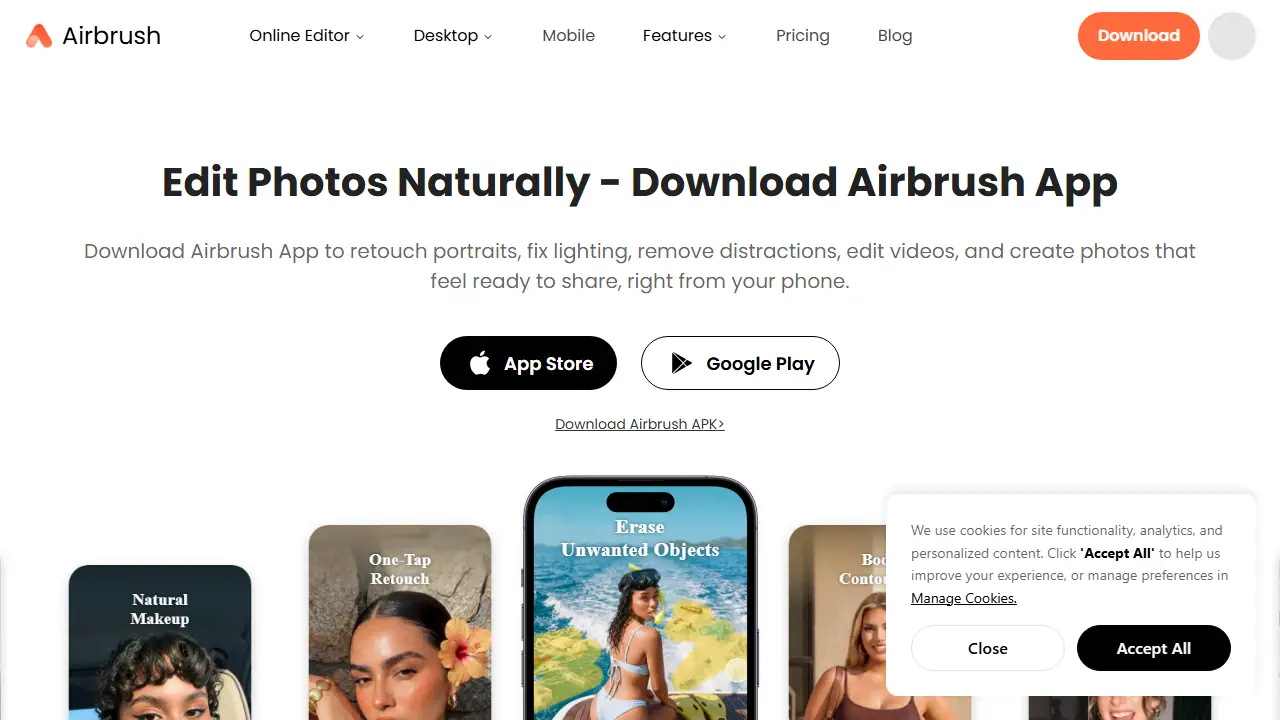
What is Airbrush?
Airbrush is an AI photo editing app from Pixocial Technology, available on the web, desktop and mobile. It focuses on portrait work: AI Retouch, skin and makeup tools, body contouring, relighting and background changes. Beyond retouching, it offers an eraser for removing distractions such as passersby or clutter, AI Replace for swapping objects, AI Expand for extending a frame, AI Repair for blurry areas, and Bokeh for background blur.
You open a photo, choose a tool or one-tap preset, and adjust the result with sliders or brushes. The same face and body tools can be applied to videos. Some features consume credits: a photo costs 1 credit and video costs 2 credits per minute, while the free plan has limited access to many tools. Users can also try hairstyles, natural makeup and AI avatar generation.
Key features
- AI Retouch for portraits with skin, makeup and body tools
- Relight with lighting effects
- Eraser and object removal
- AI Replace and AI Expand
- AI Repair for blurry or damaged areas
- Face and body editing applied to videos
Who is it for
- content creators
- social media users
- people retouching portraits and selfies
Pros and cons
- Easy one-tap retouching for portraits
- Object removal and cleanup tools that work on photos and videos
- Many tools are limited on the free plan
- Advanced features use a credit system
Airbrush pricing
| Plan | Price | Includes |
|---|---|---|
| Credits Pack | 9 USD / one-time | 10 credits, about 0.90 USD per credit, valid for 1 year |
| Web Plus Monthly | 15.95 USD / month | 80 credits per month, 10GB upload space, unlimited exports, limited time offer |
| Web Plus Annually | 95.95 USD / year | 80 credits per month, 10GB upload space, unlimited exports, 40% savings versus monthly |
Prices copied from Airbrush pricing, checked October 12, 2026. Currency as shown by the vendor; taxes may apply.
Is Airbrush free?
There is a free trial. Free plan with limited access to many tools; the homepage also mentions a 7-day free trial for download.
Featured in
Airbrush alternatives
| Tool | Price from | Free plan | Category |
|---|---|---|---|
 Facetune Facetune | 25 USD/mo | trial | Photo editing |
 Fotor Fotor | not listed | ? | Photo editing |
 Photoroom Photoroom | 14,99 PLN/mo | trial | Photo editing |
 Deep-Image.ai Deep-Image.ai | not listed | trial | Photo editing |
 Dzine Dzine | 8.99 USD/mo | trial | Image generators |
 Pixelcut Pixelcut | 8 USD/mo | yes | Photo editing |
All alternatives to Airbrush →
FAQ
What is Airbrush used for?
AI photo and portrait editor for retouching faces, fixing lighting, removing objects and editing short videos, aimed at creators and everyday users.
Is Airbrush free?
There is a free trial. Free plan with limited access to many tools; the homepage also mentions a 7-day free trial for download.
How much does Airbrush cost?
The cheapest paid plan is 9 USD (vendor pricing, October 12, 2026).
What are the best Airbrush alternatives?
Closest alternatives: Facetune, Fotor, Photoroom, Deep-Image.ai, Dzine.
Data checked October 12, 2026 on the vendor website (appairbrush.com).